Mastering Booklet Design for Professional Impact
A well-executed booklet design is a powerhouse tool for communication. It’s not just a stack of folded paper; it's a tangible narrative that guides a reader through information, tells a brand story, or showcases a portfolio with a deliberate, hands-on pace. In a digital-first world, a physical booklet offers a unique weight and presence that screens can't replicate, making it a critical piece of editorial design for businesses, creatives, and publishers alike.
The Anatomy of an Effective Booklet Template
Creating a booklet from scratch can be a daunting task, involving meticulous setup for bleed, margins, and page sequencing. This is where a professional, layered template transforms the process. A robust booklet design template, like the one described here, is built on industry standard design techniques. It’s not just about pretty layouts; it’s about a structured, fully editable file that respects professional print requirements. The specifications are the foundation: 8.5x11 inches with a 0.25” bleed ensures your design extends cleanly to the edge after trimming, while 0.5" margins keep critical content safe. Working in CMYK color at 300dpi resolution is non-negotiable for sharp, vibrant prints, and the inclusion of a front & back cover within the 18 pages overall provides a complete, ready-to-assemble package.
Where Booklet Design Truly Shines
The versatility of a strong booklet design is its greatest asset. For small business owners, it’s the perfect format for a product catalog, a service menu, or an event program. Marketers and brand strategists leverage them for lookbooks, pitch decks, and investor packets, where the physical format adds a layer of seriousness and perceived value. Content creators and bloggers can repurpose their best content into a beautifully designed guide or e-book, offering it as a lead magnet. The template’s structure, with its layered templates and organized pages, makes it straightforward to adapt the core booklet design for vastly different contexts—from a minimalist corporate report to a vibrant, artistic portfolio.
Elevating Your Brand Through Thoughtful Layout
How you arrange content within a booklet directly influences your audience's experience and their perception of your brand. A cluttered, disorganized layout feels amateurish and undermines trust. A clean, well-structured booklet design, however, establishes a clear visual hierarchy. Strategic use of whitespace, consistent typography, and logical flow guide the reader's eye, making complex information digestible. This professionalism reinforces your brand identity, showing attention to detail and respect for your audience's time. The template’s easy to customize any colors feature and use of Google Fonts are practical tools here, allowing you to seamlessly integrate your exact brand palette and typographic voice, ensuring consistency across all your design assets.
Practical Execution: From Template to Tangible Asset
Working with a template file—whether it's an Adobe InDesign .indd, .indml, .indt, or a PDF—should be an intuitive process. The goal is to spend your creative energy on content and customization, not on technical setup. Here’s how to approach it effectively:
- Start with the Structure: Before diving into colors and images, review the entire page count. Understand the flow from cover to back. The 18 pages are your canvas; map out where your key sections will live.
- Embrace the Layers: The fully editable, layered nature of the file is crucial. Use layers to separate text, images, and background elements. This makes global changes—like updating a color scheme or swapping a graphic—efficient and error-free.
- Typography is Your Voice: While the template uses free fonts, don't just accept the default. Test your own brand fonts. Ensure body text is highly readable at print size, and use display fonts for headings to inject personality. Good font pairing creates rhythm and emphasis.
- Color with Purpose: Utilize the CMYK color swatches. Assign colors to specific elements—headings, accents, backgrounds—and use the template’s easy color customization to update them globally. This maintains a cohesive look throughout the booklet design.
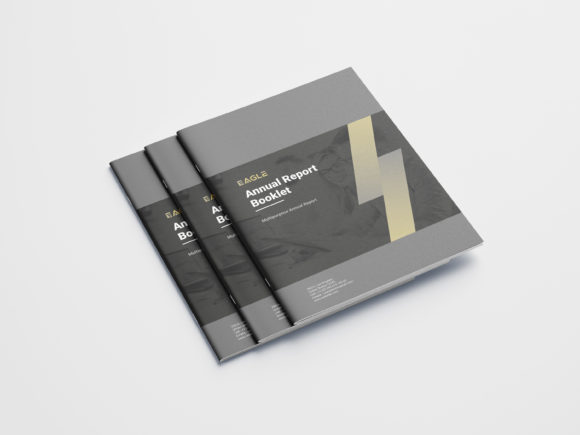
- Final Proofing: Use the included mock-up file and JPEG preview to visualize the final product. Check for text alignment, image resolution, and ensure all content is within the safe margins. The help file can clarify any technical uncertainties.
By treating the template as a professional framework rather than a rigid cage, you unlock its true potential. It handles the technical heavy lifting—print readiness, proper bleeds, organized layers—freeing you to focus on crafting a compelling message and a visually striking piece that truly represents your work or business. A great booklet design becomes more than a document; it becomes a memorable experience in your client's or customer's hands.