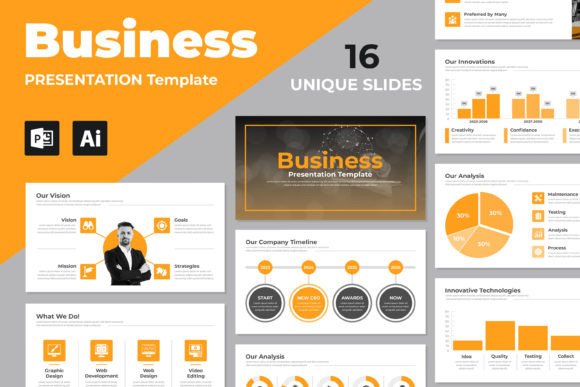
Minimalist Presentation Design: Clarity Over Clutter
In the world of business communication, the adage "less is more" has never been more relevant. We’ve all sat through presentations where the text is too small, the graphics are overwhelming, and the message gets lost in a sea of visual noise. Minimalist Presentation Design strips away these distractions to focus on what truly matters: your core message. It is not about making things boring or empty; rather, it is an intentional design philosophy that prioritizes clarity, whitespace, and high-impact visuals. By adopting this style, you create a canvas that allows your ideas to breathe, making them significantly easier for your audience to digest and remember.
The Anatomy of a Minimalist Approach
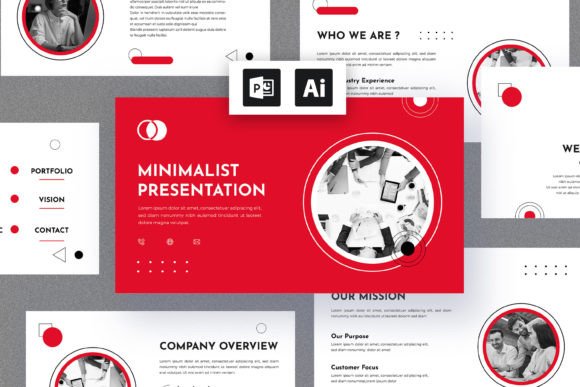
Visually, a minimalist presentation relies on a disciplined use of space. The "negative space" or whitespace is just as important as the content itself, serving to guide the viewer’s eye naturally from one point to the next. The personality of this design style is confident, modern, and professional. It avoids chaotic gradients or excessive shadows in favor of flat design, clean lines, and a restrained color palette—often monochromatic with a single accent color to draw attention to key data points. This approach creates a sophisticated aesthetic that feels current and timeless, ensuring your brand identity looks polished rather than dated.
One of the most critical components of this design philosophy is typography. In a minimalist deck, the font isn't just text; it is a primary design element. You often see the use of a high-quality sans serif font for body copy to ensure maximum readability on screens, paired with a bold display font for headers to establish hierarchy. Because there are fewer graphical elements to hide behind, the typeface choice carries significant weight. A premium font with clean letterforms and ample x-height ensures that your text remains legible even from the back of a conference room.
Strategic Application Across Industries
The versatility of Minimalist Presentation Design makes it a powerful tool across various sectors. For entrepreneurs and startups, a clean slide deck conveys efficiency and focus—essential traits when pitching to investors. In marketing and branding, this style helps isolate key metrics and campaign results, preventing data fatigue. Designers and creative professionals often prefer this aesthetic because it complements their portfolio work without competing for attention. Whether you are creating a quarterly report, a product launch deck, or an educational webinar, the structure remains universally effective.
Furthermore, this design style bridges the gap between digital and print. The same principles that make a slide deck effective—clear hierarchy and balanced composition—apply directly to editorial design and packaging design. If you are a small business owner, using a consistent minimalist theme across your web design, social media graphics, and physical materials creates a cohesive brand identity. The simplicity of the layout makes it incredibly easy to adapt content for different formats without the design falling apart, which is a lifesaver for busy content creators.
Mastering Visual Hierarchy and Flow
The true power of Minimalist Presentation Design lies in how it enhances visual hierarchy. By limiting the number of elements on a slide, you force the audience to focus on the most important information. This is where the interplay between font pairing and imagery becomes crucial. For instance, using a geometric modern typography style for headers can contrast beautifully with a serif font for quotes, adding elegance without complexity. This deliberate contrast helps the audience subconsciously understand the relationship between different pieces of information.
To achieve this effectively, you must be ruthless in editing your content. If a slide has too much text, break it into multiple slides. Use high-quality, full-bleed images that tell a story on their own, overlaying them with minimal text. When it comes to data, avoid standard Excel charts; instead, use custom infographics that align with your color scheme. This attention to detail ensures that your presentation doesn't just look good—it communicates effectively. Remember, the goal of a creative font or graphic is to support the narrative, not to overshadow the speaker.
Practical Tips for Implementation
When selecting your design assets, look for versatility. A great multipurpose template should include various layouts—title slides, team bios, data visualization, and quote slides—that adhere to the minimalist ethos. Here are a few practical steps to ensure your design hits the mark:
- Evaluate Your Content: Before choosing a template, audit your content. Do you have heavy data? Look for layouts with ample space for charts. Are you telling a story? Look for image-centric slides.
- Check Font Licensing: Ensure any commercial font used in your template is licensed for your intended use. Many templates come with links to free fonts, which is great, but always verify the terms.
- Test Readability: A font might look beautiful on a mockup, but test it on a projector or a mobile screen. Sans serif fonts generally perform better for digital reading, while serif fonts can add a touch of class for specific headings.
- Maintain Consistency: Stick to the style guide provided in the template. If the accent color is teal, don't randomly add a red button. Consistency builds trust and professionalism.
Ultimately, Minimalist Presentation Design is about respecting your audience's time and intelligence. By providing a clean, uncluttered visual experience, you facilitate better understanding and retention. Whether you are a blogger, a marketer, or a corporate executive, adopting this approach ensures your ideas are presented with the clarity and impact they deserve. It transforms a standard slide deck into a strategic communication tool that drives results.